A searchable library, and a home for every clip
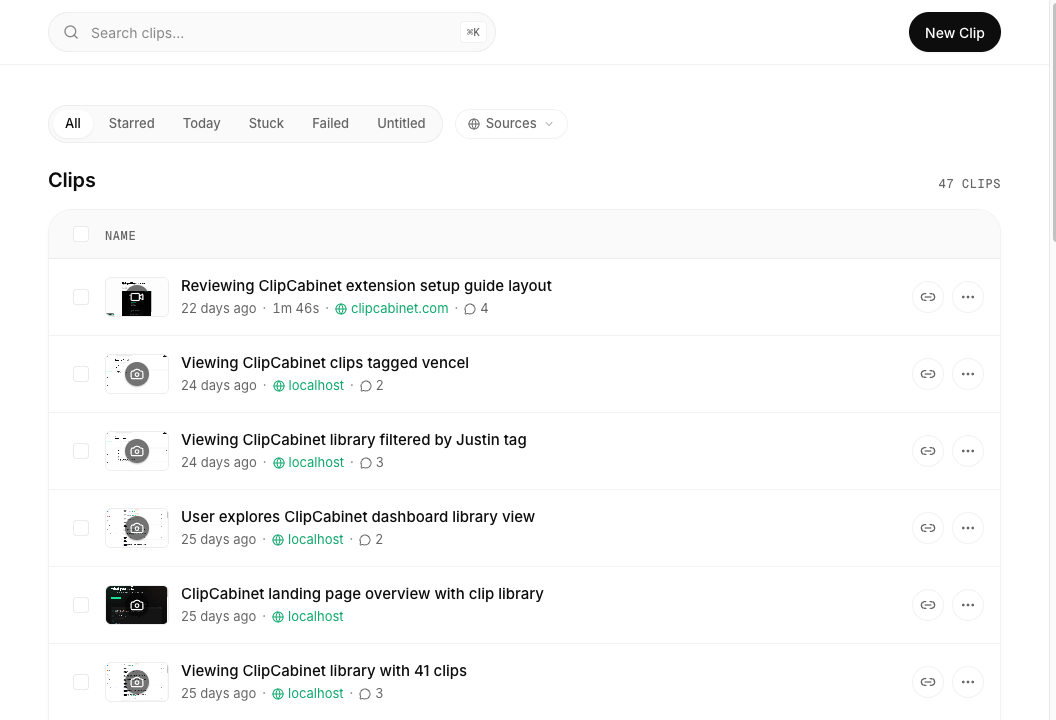
Once you have more than a handful of recordings, finding the right one becomes the hard part, and a wall of thumbnails doesn't help when what you remember is something that was said, not how it looked.
Your clips now live in a library you can search by content. Press ⌘K from anywhere to search across titles, summaries, and the full transcript of every clip; when the match is inside what someone said, the matching line appears right under the result so you can see why it surfaced. The library lists each clip with its title, length, source, tags, and comment count.
Opening a clip takes you to its detail page: the video alongside its transcript and summary, the comments left on it, and the artifacts ClipCabinet pulled out, links, errors, code, file paths, listed beside the player. From there you can copy the clip as Markdown, as a plain transcript, or as a block of AI-ready instructions.
Open a clip from the library, or jump straight to one with ⌘K.